

Objective
This blog explains how PCB component management helps design teams work faster, make fewer mistakes, and build smoother workflows from schematic to production. The goal is to show why better part control is a real driver of PCB design efficiency improvement, not just an extra admin task.
Key Takeaways
- PCB component management gives designers one trusted place for part data, symbols, footprints, and sourcing details.
- Poor component data wastes time, causes rework, and can lead to assembly or sourcing problems.
- Good component management services PCB teams use centralized libraries, lifecycle checks, validation rules, and approval workflows.
- Live supplier data helps teams check stock, pricing, and lifecycle risk before problems reach production.
- Better component control improves BOM accuracy, design reuse, and team coordination.
- Real PCB design efficiency improvement often starts with trusted libraries, not just faster layout tools.
Table Of Contents
- What Is PCB Component Management?
- Why PCB Design Efficiency Improvement Starts with Components
- Common Problems Designers Face Without Component Management Services
- How Component Management Services PCB Teams Actually Work
- Key Features That Support PCB Design Efficiency Improvement
- How PCB Component Management Helps at Every Design Stage
- Real Benefits PCB Designers Experience
- How to Get Started with PCB Component Management
- Conclusion
- FAQs
1. What Is PCB Component Management?
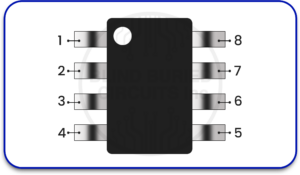
PCB component management is the process of creating, organizing, checking, updating, and approving all the part data used in a PCB design system. That includes symbols, footprints, parametric values, manufacturer part numbers, supplier links, lifecycle status, revision history, and sometimes 3D models too. Modern library systems also use templates, naming rules, and lifecycle settings so that every new part follows the same structure.
Why Every PCB Design Needs a Component System
Every PCB design depends on component data long before the board reaches layout. If the symbol is wrong, the schematic can be wrong. If the footprint is wrong, the assembly can fail. If the manufacturer’s part number is outdated, purchasing can hit delays. A proper component system gives the team one controlled source of truth instead of letting every designer build parts in a different way. That reduces repeat work and helps verified parts get reused across future projects.
What Kind of Data Does It Manage?
A strong system usually manages:
- schematic symbols
- PCB footprints
- 2D and 3D CAD models
- manufacturer part numbers
- approved alternates
- package details
- voltage, tolerance, and size data
- lifecycle state such as active, NRND, or obsolete
- revision and approval status
These are not small details. They affect fit, function, sourcing, and manufacturability. Best-practice guidance also stresses that footprints should match the exact manufacturer part number and follow recognized footprint standards such as IPC-based practices.
2. Why PCB Design Efficiency Improvement Starts with Components
When people talk about PCB design efficiency improvement, they often think about routing speed or better simulation tools. Those things matter, but efficiency usually starts much earlier. It starts with whether the parts in the library can be trusted.
The Hidden Time Cost of Poor Component Organization
Poor organization creates slow work in quiet ways. A designer may stop to check a datasheet because a footprint looks uncertain. Another may rebuild a symbol that already exists because the naming is inconsistent. Someone in sourcing may ask engineering whether a part is still active because the BOM has no lifecycle field. None of these delays looks huge on its own, but together they slow the whole design cycle. Cadence and Ultra Librarian both emphasize that organized, validated libraries reduce repeat work and help teams stay consistent across designs.
How Disorganized Data Slows Down the Entire Team
Disorganized component data not only hurts the PCB designer. It also slows reviewers, procurement staff, manufacturing planners, and anyone else who depends on the design database. A bad library can create unclear BOMs, duplicate parts, and part choices that are hard to source. In a real workflow, that means more emails, more manual checking, and more rework. At Blind Buried Circuits, this matters because advanced boards leave less room for preventable library mistakes. Dense designs need dependable part data from the start.
3. Common Problems Designers Face Without Component Management Services
Without structured component management services for PCB teams or processes, the same problems tend to show up again and again.
Discontinued Parts Found Too Late
A part may look fine in the design tool, but already be near the end of its life. If nobody checks the lifecycle status until purchasing starts, the team may have to swap the part late in the project. Altium’s documentation and obsolescence guidance make clear that lifecycle validation is a major part of modern component control.
Wrong Footprints Causing Assembly Failures
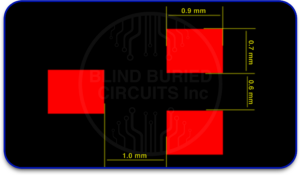
A footprint with bad pad spacing, wrong pin numbering, or a mismatch to the actual package can create soldering problems, alignment issues, or complete assembly failure. Footprint best-practice guidance stresses accurate pad sizing, correct pin numbering, and tolerance awareness because these directly affect assembly reliability.
Duplicate Library Entries Creating Confusion
It is common for teams without a controlled system to end up with multiple versions of what is basically the same part. One entry may have the full MPN. Another may use a nickname. A third may have an outdated footprint. That creates confusion during design and BOM generation. Centralized libraries and version control reduce this risk.
Manual BOM Errors Delaying Production
Manual BOM work often leads to mismatched part numbers, missing alternates, or unclear supplier data. BOM tools that use live component databases can reduce these problems by matching part data, checking offers, and showing current stock and pricing.
4. How Component Management Services PCB Teams Actually Work
A practical PCB component management workflow usually follows a clear path.
Step 1: Building a Centralized Component Library
The first step is to keep approved components in one shared library instead of scattered personal files. Centralized libraries improve consistency and reduce duplicate effort.
Step 2: Attaching Complete Data to Every Part
Each part should include the full set of useful fields, not just a symbol and footprint. Good templates help teams apply the right naming, taxonomy, revision, and BOM-ready parameters every time.
Step 3: Connecting to Live Supplier Databases
A strong system connects design data to current supplier information so teams can see availability, pricing, and sourcing options. This is especially useful when lead times change fast.
Step 4: Automated Lifecycle Alerts
Modern systems can flag obsolete parts, abandoned, or otherwise risky before manufacturing moves ahead. That helps prevent late-stage surprises.
Step 5: Review and Approval Workflows
Before a new part reaches the main library, it should be reviewed and approved. This keeps unverified entries out of active designs and protects library quality over time.
5. Key Features That Support PCB Design Efficiency Improvement
Parametric Search
Parametric search lets teams filter parts by values such as capacitance, voltage, package, tolerance, or manufacturer. That helps designers find approved parts faster and avoid creating duplicates. This supports real PCB design efficiency improvement.
Automated Footprint and Symbol Validation
Validation checks help confirm that symbols and footprints match the datasheet and the manufacturer’s part number. That reduces assembly risk.
Version Control for Component Data
Version control shows what changed, who changed it, and which revision is approved. That matters when teams reuse parts across many designs.
Real-Time Stock and Pricing Integration
When stock and pricing appear beside the part data, sourcing decisions get faster and better informed.
Smart BOM Generation
A smart BOM process pulls approved fields from the library instead of relying on manual typing. That improves consistency and reduces errors.
6. How PCB Component Management Helps at Every Design Stage
Schematic Phase
Designers choose verified parts faster and spend less time checking basic data.
Layout Phase
Accurate footprints and 3D data reduce placement errors and fit problems.
Design Review Phase
Reviewers can trust the part history, revision status, and approval state.
Procurement Phase
Buyers get cleaner BOMs with better stock, pricing, and lifecycle visibility.
Manufacturing Phase
Assembly teams benefit from footprints and package data that were validated earlier in the flow. That lowers the chance of avoidable manufacturing issues.
7. Real Benefits PCB Designers Experience
Design teams often see:
- less time spent building parts manually
- fewer footprint-related mistakes
- cleaner BOMs
- better part reuse
- faster reviews
- fewer sourcing surprises
- smoother handoff to manufacturing
- better consistency across projects
These are the kinds of outcomes that make component management services PCB workflows worth the effort. They also explain why Blind Buried Circuits benefits from disciplined component control in technically demanding PCB programs.
8. How to Get Started with PCB Component Management
Audit Your Existing Library
Check for duplicates, missing fields, outdated parts, and footprint problems.
Set a Data Standard
Define what every approved part must include. Keep it simple and consistent.
Choose the Right Tool
Use a tool that supports shared libraries, validation, lifecycle tracking, and supplier integration. Altium, Cadence/OrCAD, and other major PCB platforms support forms of component-management integration and controlled library workflows.
Build Gradually, Not All at Once
Do not try to rebuild everything in one week. Start with the most-used parts and grow from there.
Set Up a Simple Review Process
Even a light approval step is better than none. The main goal is to stop unverified parts from entering active designs.
9. Conclusion
Good PCB work depends on good part data. That is the simple truth behind PCB component management.
When teams use a structured system, they waste less time, make fewer mistakes, and respond faster when sourcing conditions change. That is why PCB design efficiency improvement often starts with the library, not the layout screen. For advanced design work, Blind Buried Circuits knows that strong component control supports better decisions from the first symbol placed to the final manufacturing release.
CTA Quote: Better boards start with better part data. Clean libraries, trusted footprints, and live sourcing insight help designers move faster with fewer surprises.
FAQs
Q1. Is PCB component management only useful for large teams?
No. Large teams may feel the pain sooner, but even small teams benefit because they also lose time to duplicate work, bad footprints, and part confusion.
Q2. How does it prevent discontinued part problems?
It helps by tracking lifecycle status and warning teams when a part is NRND, obsolete, or otherwise risky before production moves forward.
Q3. What is the difference between a component library and a management system?
A library stores part of the data. A management system adds control around that data, such as templates, revision rules, approvals, lifecycle states, and supplier connections.
Q4. Does it improve BOM accuracy?
Yes. Better library fields and live supplier matching improve BOM consistency and reduce manual entry mistakes.
Q5. Can it help during supply chain disruptions?
Yes. Real-time stock, pricing, and lifecycle information help teams choose safer parts and alternatives when supply conditions change.
Q6. How often should a component library be maintained?
There is no single fixed schedule, but lifecycle states, supplier data, and approvals should be reviewed regularly so outdated or risky parts do not remain in active use. That is an inference from industry guidance on lifecycle control and centralized library upkeep.
Q7. Which PCB design tools support component management integration?
Major tools and ecosystems such as Altium, OrCAD/Cadence, and library services that connect to EDA platforms support component management features in different ways.
Q8. What happens when a needed part isn’t in the library yet?
The usual process is to submit a part request, build the symbol and footprint from verified source data, add required parameters, review it, and then release it into the approved library.