

PCBs, or printed circuit boards, are what make all of your gadgets work, from cell phones to microwaves. However, every PCB maker needs the correct files before they can create a single circuit. The manufacturing machines know precisely what to perform because of these files. If you want to learn about custom PCB production or PCB fabrication in the US and other countries, it’s essential to understand the design file types. This blog explains the key file types, their functions, and why they are crucial for creating PCBs.
The Basics: What Are PCB Design File Formats?
PCB file formats store information about:
- Where the copper traces go
- Where holes are drilled
- Labels and markings
- All the details needed for your board
Different pcb manufacturers may ask for different types, but some formats are used everywhere.

Gerber Files: The Industry Standard
What Is a Gerber File?
The Gerber file format is the basic language of pcb manufacturing. It’s used worldwide. Each file describes a layer of the board: copper traces, solder mask, silkscreen, and more. Usually, one PCB will have several Gerber files, one for each part of the process.
- File extension: .gbr or .ger
- What’s inside: Information for each layer, in a text format machines can read
Why Do PCB Manufacturers Use Gerber Files?
Because Gerber files are detailed and standard, machines use them to:
- Build each layer of the board
- Cut out shapes
- Place all labels
Gerber files are trusted for both simple and complex custom pcb projects.
Real-life analogy: Think of Gerber files as a set of clear, color-coded road maps, one for each level in a video game.
Types of Gerber Files
- RS-274X (Extended Gerber): Most common today, holds extra info like layer names
- RS-274-D (Standard Gerber): Older and less used now
Excellon Files: The Drill Masters
While Gerber files show the layers, Excellon files focus on drilling.
- File extension: .drl
- Use: Tells machines where and how big to drill the holes
Every pcb manufacturer uses Excellon files during PCB production, especially for double-sided or multilayer boards.
ODB++: Smarter, All-in-One Format
What Is ODB++?
ODB++ is a newer format designed to simplify the manufacturing process. Unlike Gerber, it groups almost every bit of board information into a single, organized archive, like a folder full of directions for every step.
- What’s inside: Layer data, drill info, material stack up, test points, assembly notes, even component locations
- Format: Compressed file with lots of folders, easy for advanced machines to process

Why Is ODB++ Popular?
ODB++ reduces confusion and cuts the risk of mistakes. One file to rule them all! It’s now a standard among high-tech pcb manufacturers because:
- Less chance of missing files
- Fewer errors between design and production
- Simulation and testing info included
- Supports very complex custom pcb production for industries like automotive and medical devices.
Tip: If your project might need changes later, ODB++ can make updates smoother.
IPC-2581: New Kid on the Block
IPC-2581 is a newer, open standard that tries to do what ODB++ does, but in a universal, XML-based way. It packs everything including layers, placements, tests, and materials into one file.
- Pro: Open and widely supported in new tools
- Con: Not as widely used as Gerber or ODB++, yet
Many pcb manufacturers and designers watch the rise of IPC-2581, hoping for more compatibility in the future.
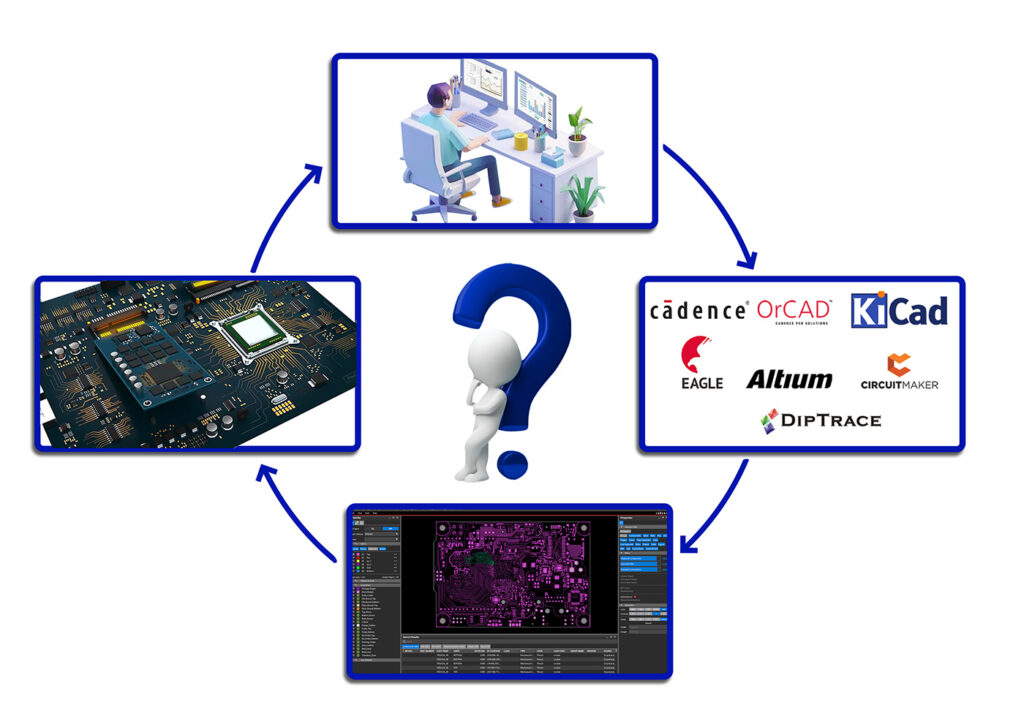
Tool-Specific Formats: The Starting Point
Most PCB layout programs, like Altium Designer, Eagle, or KiCad, save files in their own unique formats.
- Altium: .pcbdoc
- Eagle: .brd, .sch
- KiCad: .kicad_pcb, .sch
To share your design with a pcb manufacturer, you must export your work into Gerber, ODB++, or another manufacturing format.
Comparing the Main File Formats
| Format | Used For | Contains | Good For | Common In |
| Gerber | Production layers | Image data per layer | All board types | Almost everywhere |
| Excellon | Drilling | Hole locations/sizes | All boards with holes | All board shops |
| ODB++ | “All-in-one” production, assembly | Nearly everything | Complex, high-volume | Advanced factories |
| IPC-2581 | New, unified process | Everything + more | Complex, modern | Emerging factories |
| Design-specific | Schematics, layout | Everything (for design) | Working in software | Design only |
How the File Types Work Together
- Designer creates the board in their chosen software.
- Files get exported, usually Gerber for layers, Excellon for holes.
- Some designers use ODB++ or IPC-2581 to send everything at once.
- The pcb fabrication usa shop checks files for errors.
- Production begins, using these files as guides.
Why Clear File Formats Mean Better PCBs
A single missing file can delay everything. If layers don’t line up or drill holes are misplaced, the whole order can be wasted. That’s why custom pcb producers stress sending full, correct files.
Common problems caused by file errors:
- Wrong hole sizes
- Missing solder mask
- Shifted layers
- Labels or markings gone
Tip: Always double-check your exported files in a Gerber viewer before sending them to your manufacturer.
Product Highlights for Better File Prep
Custom PCB production means every board is unique. Highlight these habits for success:
- Organize files: Name each layer clearly (e.g., Top_Copper.gbr).
- Review all exports: Use a Gerber viewer to check what manufacturers will see.
- Include a readme: Add file explanations for each layer.
- Check with your manufacturer: Some need files zipped, some want folders.
Tips for Your Next PCB Manufacturing Project
- Use the preferred file format of your pcb manufacturer.
- Remember, pcb fabrication usa shops often prefer Gerber, but ODB++ makes big orders easier.
- Confirm all mechanical layers, drills, and special notes are included.
- Always add a Bill of Materials (BOM) and an assembly drawing for complex boards.
- If you’re a beginner, stick to Gerber and Excellon files, they’re safe and widely accepted.
Drawing Parallels: Blueprints for Builders
Sending PCB files is like handing house blueprints to a builder. If any detail is missing, be it windows, doors, or wiring, the house just won’t turn out right. The better the files, the smoother your pcb manufacturing journey will be!
Final Thoughts: Choosing the Right Format
Whether you’re building a simple gadget or a high-tech device, understanding file formats is essential for smooth custom pcb production. Gerber files are the backbone. ODB++ is the all-in-one solution for complex projects. IPC-2581 is rising fast with its open, complete approach. Pick what suits your project and check with your manufacturer for best results.
Remember, even the fanciest design is only as good as the files that describe it. Good file prep is good practice, leading to better boards, less waste, and faster results in the world of pcb manufacturing.
Key Takeaways:
- Gerber and Excellon files are must-haves for every pcb manufacturer.
- ODB++ and IPC-2581 offer smarter, all-in-one solutions as technology advances.
- Always check your files before sending.
- When in doubt, ask your PCB fabrication partner in USA, Blind Buried Circuits which format they prefer.
It’s these blueprints, simple, clean, and detailed, that help turn your creative ideas into real, working products. Good design starts with good files.